Alliance Of The Earth
43 Street Washington
Katina 30007 VA,DCInstitute / Outside Institute / QuartersInstitute / NavigatorsInstitute / Q.R
HTML CODE EA
TUTORIAL BY CODE
SOURCE OF THE PAGE

WWW.ALLIANCEOFTHEEARTH.INFO
TUTORIAL BY CODE
SOURCE OF THE PAGE
ABOUT
| Page | Page | Page | Page |
|---|---|---|---|
|
PAGE 1 ITEMS TUTORIAL
FOR OPEN CODE SOURCE EA TUTORIAL
Tutorial by code source of the page html Click Right Menu Contextual -> Select view Code Source Of The Page 1. FULL PAGE WITH WINDOW.INNERHEIGHT2. BACKGROUND PICTURE WITH OPACITY
|
|||
| 1 | 2 | 3 | 4 |
| Page | Page | Page | Page |
|---|---|---|---|
|
PAGE 5 ITEMS TUTORIAL
FOR OPEN CODE SOURCE EA TUTORIAL
Tutorial by code source of the page html Click Right Menu Contextual -> Select view Code Source Of The Page 1. PAGE 4 +2. Container with various dimensions ClassName for various containers,Example :<div class="panelLeft panelLeftHeight400px">3. Width Maximum TABLE Fixed by attribute max-width4. Table Centered width:1024px in High Resolution screen 1280 * 1024 , 1600 * 900 ...PAGE 6 ITEMS TUTORIAL
FOR OPEN CODE SOURCE EA TUTORIAL
Tutorial by code source of the page html Click Right Menu Contextual -> Select view Code Source Of The Page 1. PAGE 5 +2. Container with various dimensions ClassName for various containers,Example :<div class="panelLeft panelLeftHeight400px">3. Width Maximum TABLE Fixed by attribute max-width4. Table Centered width:1024px in High Resolution screen 1280 * 1024 , 1600 * 900 ...5. Zoom + / - on the width tag Table 100% to width initial CSS User. Double click on the bar vertical about it6. Using Protocol url mailto for send a email example: mailto:webmaster@allianceoftheearth.infoPAGE 7 ITEMS TUTORIAL
FOR OPEN CODE SOURCE EA TUTORIAL
Tutorial by code source of the page html Click Right Menu Contextual -> Select view Code Source Of The Page 1. PAGE 6 +2. Container with various dimensions ClassName for various containers,Example :<div class="panelRight panelRightWidth100px panelRightHeight100px">3. Width Maximum TABLE Fixed by attribute max-width4. Table Centered width:1024px in High Resolution screen 1280 * 1024 , 1600 * 900 ...5. Zoom + / - on the width tag Table 100% to width initial CSS User. Double click on the bar vertical about it6. Creation multiple tag table in using window.innerHeight7. See Modification appel function in the tag body and HTMLPage7.js<body onload="HTMLPageTabInnerHeight(02);">PAGE 8 ITEMS TUTORIAL
FOR OPEN CODE SOURCE EA TUTORIAL
Tutorial by code source of the page html Click Right Menu Contextual -> Select view Code Source Of The Page 1. Drag & DropEach Panels, Panel Left and Panel Right have a Drag & Drop. No interference with the other panel. See details in function drop(event,this)Eventsdraggableondragstartondragoverondropondropend2. Container with various dimensions ClassName for various containers,Example :<div class="panelRight panelRightHeight400px">3. Width Maximum TABLE Fixed by attribute max-width4. Table Centered width:1024px in High Resolution screen 1280 * 1024 , 1600 * 900 ...5. Zoom + / - on the width tag Table 100% to width initial CSS User. Double click on the bar vertical about it6. See Modification appel function in the tag body and HTMLPage8.js<body onload="HTMLPageTabInnerHeight(01);">7. ToDo : Modified the last cell Span of the Right Panel in HTMLPage8.js for a drag and drop. Download HTMLPage8<span id="dragdrop-ea-psi-13"> |
|||
| 5 | 6 | 7 | 8 |
| Page | Page | Page | Page |
|---|---|---|---|
|
PAGE 9 ITEMS TUTORIAL
FOR OPEN CODE SOURCE EA TUTORIAL
Tutorial by code source of the page html Click Right Menu Contextual -> Select view Code Source Of The Page 1. PAGE 3 +2. Left Panel and Right Panel cached when the Table is reduced. Operation without remove the cells in the panels3. Change Image displayed by a picture of your Computer. Using FileReader() Object for search a file image on Hard Disk.4. Width Maximum TABLE Fixed by attribute max-width5. Table Centered width:1024px in High Resolution screen 1280 * 1024 , 1600 * 900 ...PAGE 10 ITEMS TUTORIAL
FOR OPEN CODE SOURCE EA TUTORIAL
Tutorial by code source of the page html Click Right Menu Contextual -> Select view Code Source Of The Page 1. PAGE 7 +2. Using Rules for Tag Table : rows and cols3. Choice effect if Rules using with attributes tables, example with attributes:<table border="15" cellspacing="15" cellpadding="0">4. Panel Pages for access direct to Page Up and Page Down. Using function scrollIntoView()5. Change effect visual transparent by Property OPACITY.6. Width Maximum TABLE Fixed by attribute max-width7. Table Centered width:1024px in High Resolution screen 1280 * 1024 , 1600 * 900 ...PAGE 11 ITEMS TUTORIAL
FOR OPEN CODE SOURCE EA TUTORIAL
Tutorial by code source of the page html Click Right Menu Contextual -> Select view Code Source Of The Page 1. PAGE 5 +2. Create a simple Form using GET as method for transmit control name and values. Below Url parameters transmit by the FormHTMLPage11.html?Form01UserLogin=john+water&Form01ChoiceTextColor=midnightblue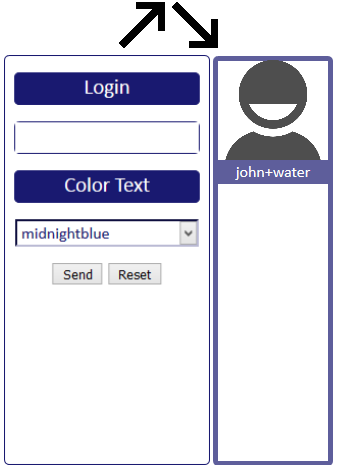
3. Modification body Color Text Page HTML via the Form as Tutorial4. Using a Function named $_GET as code snippets by the webmaster. This is a function which retrieve url parameters transmit by the Form. Example : var strUserLogin = $_GET("Form01UserLogin")5. Display Data pair Control Name | Value in a same html file as example in this tutorial : <form action="">6. Display Data with accentued characters. Using function decodeURIComponent()7. Using DOM for access at the class tag body8. Width Maximum TABLE Fixed by attribute max-width9. Table Centered width:1152px in High Resolution screen 1280 * 1024 , 1600 * 900 ...10. ToDO : replace the + by the character space of the variable strUserLoginSimulation as input data :STEP A. input : User Login by the form => John WaterSTEP B. Send the FormSTEP C. output as result: john+water => See the pictures aboveExercice to do at the start Line =>var strUserLogin = $_GET("Form01UserLogin");PAGE 12 ITEMS TUTORIAL
FOR OPEN CODE SOURCE EA TUTORIAL
Tutorial by code source of the page html Click Right Menu Contextual -> Select view Code Source Of The Page 1. PAGE 9 +2. Date and time3. Comments to write in Textarea for each picture4. Backup data without database : Option Save HTML which save the Page HTML - Option outside tutorialWith this Option Save HTML, you can to stop the tutorial individually5. Detection navigators with code snippets outside tutorial: getnav() |
|||
| 9 | 10 | 11 | 12 |
Why Tag table has taken as example of Page HTML ?
No Code Complex Algorithmic

No complex Calcul for positioning

Using tag table for all pages

Objective :

Learn how to create a Page html by pratical
code in the contraintes of positioning and
operation calcul in basic algorithmic.
This the purpose main and not the design.

Presentation textual.

CONTENT :

1. Initiation HTML and manipulation DOM by
   approach intuitive visual

   SEE A VISUAL PAGE HTML TUTORIAL THEN
   NEXT SEE CODE SOURCE OF THE PAGE

   Buy book HTML or documentation website
   tutorial for exact definition

   https://www.w3.org/
   https://stackoverflow.com/      // .us
   https://www.developpez.com/     // .fr

2. First Pages for initiation basic events on
   tags onmouseover onclick onfocus ...
3. Access database by PHP MYSQL Or File XML
4. Display data by XMLHttpRequest
5. Finish one Page Code HTML TUTORIAL with
   external file for .js .css
<table>
	<thead>
		<tr>
		<th></th>
		</tr>
	</thead>
	<tfoot>
		<tr>
		<th></th>
		</tr>
	</tfoot>
	<tbody>
		<tr>
		<td></td>
		</tr>
	</tbody>
</table>
| heading | ||
|---|---|---|
| footer | ||
| row1 col1 | col 2 | |
| row2 col1 | ||
<table width="50%" border="1" align="center">
<caption>Tag Table</caption>
 <thead>
  <tr>
  <th colspan="3">heading</th>
  </tr>
 </thead>
 <tfoot>
  <tr>
  <th colspan="2">footer</th>
  </tr>
 </tfoot>
 <tbody>
  <tr align="center">
	<td width="70%">row1 col1</td>
	<td rowspan="2">col 2</td>
  </tr>
  <tr>
	 <td width="70%">row2 col1</td>
  </tr>
 </tbody>
 <tbody>
</table>
Table centered at screen center for 50%
in width screen

resolution screen : 1024 x 768

50% width table = (1024 / 2) - scroll bar
= about 504px = 50%
70% has reference the width of the tag table
which is 50%  , 70 % = 347px
col 2 take 2 rows width td = 30% => 149px